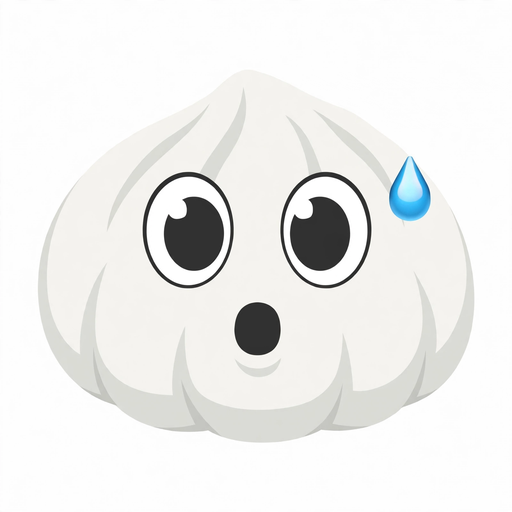
You are watching a TikTok live when the creator announces the winner of a giveaway — and it is you. Your brain short-circuits. You want to comment, but “WHAT?!” does not feel strong enough. That is exactly the moment the Stun Emoji was made for. The TikTok Stun Emoji, unlocked with the secret code [stun], is a shocked dumpling face with wide eyes, an open mouth and a sweat drop — TikTok’s visual shorthand for “I cannot believe that just happened.”
What Does the TikTok Stun Emoji Look Like?
The Stun emoji belongs to TikTok’s famous dumpling-style collection — the soft, squashed, hand-drawn faces that feel more like TikTok and less like a standard keyboard emoji. While the round-face emojis look like traditional yellow smileys, the dumpling faces are white, puffy and slightly irregular, which is what makes them so expressive.
The Stun face is one of the most dramatic of the 46 hidden emojis:
- The face: A puffy, white dumpling shape, slightly lopsided, as if the shock has physically rattled it.
- The eyes: Two wide, unevenly sized circles staring straight ahead — pure, frozen disbelief.
- The mouth: A small, dark open “o”, caught mid-gasp.
- The sweat drop: A bright blue droplet on the temple — the classic cartoon signal of panic, nervous shock or cold-sweat surprise.
Compared with the other “shock” emojis on TikTok, Stun is the paralysed one. The Astonish emoji shouts; the Scream emoji panics. Stun just freezes — which is why it fits those moments when your brain needs a second to catch up with your eyes.
TikTok Stun Emoji Meaning
The meaning of the Stun emoji on TikTok is simple: total shock, disbelief or being completely stunned. It is the emoji equivalent of blinking at your screen and saying “wait, what?”
Creators and commenters reach for it when:
- A plot twist lands in a storytime video (“she was the one who sent the email?!”)
- A magic trick or illusion defies explanation
- A sports highlight or gaming clutch play breaks the laws of physics
- A “before and after” glow-up transformation is so extreme it looks fake
- A celebrity drops a surprise announcement or a surprise collab leaks
- A prank lands so perfectly that the victim is genuinely speechless
Emotionally, it sits between amusement and anxiety. The sweat drop gives it a nervous edge — this is not just happy surprise, it is overwhelming surprise. That is why it pairs so naturally with reaction videos, unboxing fails, jump-scare clips and “you will not believe this” hooks. If the Joyful emoji celebrates the win, the Stun emoji captures the split second right before the celebration starts.
The TikTok Stun Emoji Code: [stun]
Like all of TikTok’s secret emojis, Stun is not on your keyboard. You unlock it with a shortcode: [stun]. Type it inside any TikTok comment, caption or chat, hit send, and TikTok converts it into the shocked dumpling face automatically.
How to type the [stun] code correctly
- Type the code in all lowercase — [stun], not [Stun] or [STUN].
- Use square brackets — [], not () or {}.
- No spaces anywhere — not like this: [ stun ] or [ s t u n ].
- Type it on the TikTok app (iOS or Android); the conversion happens inside TikTok only, not on Instagram or WhatsApp.
If your code stays as plain text after posting, one of those three rules is almost always the culprit. Fix the brackets, the case or the spacing, and it will convert instantly.
How to Copy and Paste the Stun Emoji
For comments and captions, the fastest route is a straight copy-paste:
- Copy the code: [stun]
- Open TikTok and tap the comment box on the video you want to react to.
- Paste the code and hit send.
- Watch it transform into the Stun emoji for everyone viewing the comment.
The same works in captions: type or paste [stun] into the caption field before publishing your video, and it renders as the emoji under your video. For live chats and DMs, the conversion works the same way — anything you type inside TikTok converts; anything pasted outside TikTok stays as text.
Download the Stun TikTok Emoji PNG
The shortcode only works inside the TikTok app. But what about when you are editing a CapCut video, designing a YouTube thumbnail, or posting on a platform where the [stun] code will not convert? That is where the Stun emoji PNG comes in.
A transparent PNG version of the Stun emoji lets you:
- Drop the shocked face into CapCut edits as a reaction sticker
- Use it as a YouTube thumbnail element for shock-content videos
- Layer it over gameplay clips, meme edits or “POV you are stunned” skits
- Send it as a sticker in messaging apps that do not render TikTok shortcodes
- Use it in Instagram Stories and Reels overlays
Hit the Download Emoji button at the top of this post to save the high-resolution PNG of the Stun emoji and use it anywhere. Because it has a clean, light background-friendly design, it blends easily into video frames without ugly white boxes around the face.
Best Moments to Use (and Avoid) the Stun Emoji
| Use the Stun emoji ✅ | Avoid it ❌ |
|---|---|
| Plot twists and surprise reveals | Sad or emotional stories — it looks mocking |
| Magic tricks and illusions | Serious debates or news — too cartoonish |
| Unbelievable sports or gaming plays | Calm, wholesome content — clashes with the vibe |
| Shocking glow-ups and transitions | When you are genuinely angry — it reads as fake shock |
| Prank reactions and jump-scare clips | Heartfelt support posts — use ❤️ instead |
| “I can’t believe this” announcements | Professional or formal replies — too casual |
Stun Emoji vs Other TikTok Shock Emojis
TikTok has a whole family of “surprise” emojis, and picking the right one changes the joke. Here is how Stun compares:
| Emoji code | Key difference | Best for |
|---|---|---|
| [stun] | Wide eyes, open mouth, sweat drop | Frozen shock, overwhelming surprise |
| [astonish] | Furrowed brows, open mouth sideways | Intense amazement, outraged awe |
| [shock] | Blue forehead, wide eyes | Sudden surprise, mild disbelief |
| [scream] | Hands on cheeks, huge mouth | Horror panic, jump-scare terror |
| [speechless] | Sideways eyes, sweat drop | Awkward disbelief, nervous silence |
Rule of thumb: if the surprise is fun and mind-blowing, Stun is your pick. If it is scary, go [scream]. If you want a playful insult instead of shock, the Slap emoji does that job better.
Best TikTok Stun Emoji Combos
One Stun emoji is a reaction. A combo is a whole sentence. Try these in comments:
- The Full Gasp: [stun] 😱 — for jump scares and horror reveals
- The Victory Freeze: [stun] 🎉 — when the win is too big to process
- The Plot Twist: [stun] 👀 — for storytime cliffhangers
- The Roast Recover: [stun] [slap] — shocked, then slapped back to reality (see our Slap emoji guide)
- The Emotional Whiplash: [stun] 🥺 — shock melting into softness, like our Wronged emoji moments
FAQs About the TikTok Stun Emoji
What is the TikTok Stun emoji code?
The code is [stun] — type it in lowercase inside square brackets in any TikTok comment, caption or chat, and it converts into the shocked dumpling emoji automatically.
What does the Stun emoji mean?
It means shock, disbelief and being completely stunned — the “I can’t believe that just happened!” reaction. The sweat drop adds a nervous, overwhelmed edge.
How do I download the Stun emoji PNG?
Use the Download Emoji button at the top of this article to save the PNG file, then import it into CapCut, your thumbnail editor or any design app.
Why is my [stun] code not converting?
Check three things: lowercase letters only, square brackets (not parentheses), and no spaces. Also make sure you are typing inside the TikTok app — the code does not convert on other platforms.
Is Stun the same as Astonish?
No. Both express shock, but Stun shows frozen, paralysed surprise (wide eyes, open mouth, sweat drop), while Astonish shows intense, almost outraged amazement. Use Stun for “wait, what?” moments.
Can I use the Stun emoji outside TikTok?
The shortcode only works inside TikTok. For everywhere else — CapCut, YouTube thumbnails, Instagram, Discord — download the PNG and insert it as an image.