If you have ever typed the code [awkward] into a TikTok comment and watched it turn into a nervous little dumpling face with a sweat drop on its brow, you already know why this hidden emoji is so relatable. The Awkward TikTok Emoji is one of TikTok’s secret shortcode emojis, and it is the perfect way to say “well, this is uncomfortable” without typing a single word.
In this guide, we will show you what the [awkward] TikTok emoji means, how to copy and paste it, where it works, and how to download a free transparent PNG of it.
What Does the [awkward] TikTok Emoji Mean?
The [awkward] TikTok emoji shows TikTok’s signature dumpling-style face with an uneasy sideways smile, one raised eyebrow, and a single blue sweat drop on its brow. It is the app’s exclusive “that was awkward” reaction icon.
The meaning of the Awkward TikTok emoji is simple: awkwardness, embarrassment, and social discomfort. People use it when a moment is cringey, a joke falls flat, someone says the wrong thing at the wrong time, or a situation turns unexpectedly uncomfortable.
Some common moments to use the [awkward] emoji include:
- Reacting to a cringey video or a second-hand embarrassment moment
- Replying when someone misreads the room in the comments
- Responding to an awkward silence in a duet or stitch
- Admitting you just said something embarrassing yourself
How to Use and Copy the [awkward] TikTok Emoji Code
Using the Awkward TikTok emoji is easy. You do not need a special keyboard or app. Just follow these steps:
- Open TikTok and find the video or comment section where you want to react.
- Type the code exactly as shown below, keeping the square brackets with no spaces:
[awkward]
- Tap send or post your comment.
- TikTok automatically converts [awkward] into the Awkward secret emoji.
To copy the code, select the text above, copy it, and paste it anywhere on TikTok: comments, captions, replies, and even live chat. Remember to type it exactly as written. The codes are case-sensitive in practice, so [awkward] must be all lowercase, and removing the brackets will stop it from working.
Where Does the [awkward] TikTok Emoji Work?
Like all of TikTok’s hidden shortcode emojis, the [awkward] emoji works only inside the TikTok app. It renders correctly in:
- Video comments and replies
- Video captions
- Live stream chat
- Direct messages on TikTok
If you paste the code outside TikTok, for example on Instagram, WhatsApp, or in a text message, it will not convert. It will simply appear as the plain text “[awkward]”. The hidden TikTok emoji system is a platform-exclusive feature, which is exactly why these secret codes feel so fun to use.
The Story Behind TikTok’s Secret Emojis
The [awkward] emoji is one of roughly 46 hidden shortcode emojis built into TikTok. Unlike the standard Unicode emoji keyboard that looks slightly different on every phone, TikTok’s secret emojis use a consistent, platform-native design: the famous white dumpling-style face with a soft, rounded look.
TikTok introduced these hidden codes to encourage creative expression and build a platform-specific culture. Because they do not appear on any standard keyboard, knowing them feels like being part of an in-group, and using them in comments makes your reaction look cooler and more native to the app. The [awkward] emoji has become a favourite for reaction content, because awkward moments are everywhere: failed challenges, misheard lyrics, unexpected plot twists, and creators roasting themselves all invite an awkward response.
Download the [awkward] TikTok Emoji PNG
Want to use the Awkward emoji outside of TikTok? You can download a free, high-quality PNG of the TikTok Awkward emoji and use it in your thumbnails, edits, and memes.
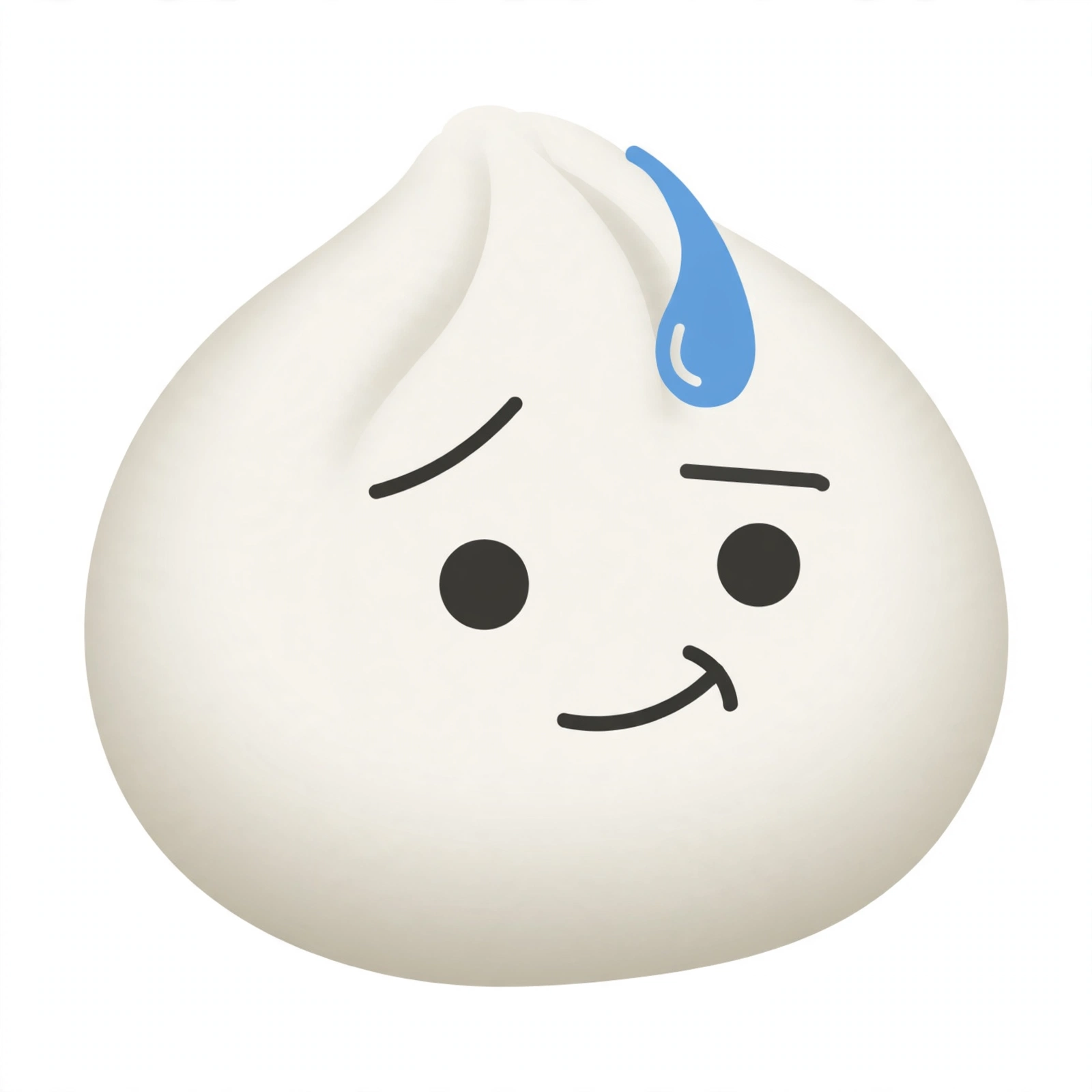
Hit the Download Emoji button above to save the transparent PNG version of the Awkward TikTok emoji straight to your device. It is free to use for personal projects, reaction memes, video edits, and thumbnails.
[awkward] vs [flushed]: What Is the Difference?
One common point of confusion is the difference between the [awkward] and [flushed] TikTok emojis, since both deal with embarrassment. They are actually two different secret emojis:
- [awkward] is the dumpling face with an uneasy smile and a sweat drop, expressing social awkwardness and discomfort.
- [flushed] is the blushing face, which expresses shyness, bashfulness, and being flustered by a compliment.
For a full breakdown of the blushing variant, see our guide on the Flushed TikTok Emoji. If you love cute emojis in general, you may also enjoy our Love Face TikTok Emoji [loveface] post.
[awkward] in Fan Culture and Edits
The Awkward TikTok emoji has a special place in reaction culture. Reaction accounts use it constantly when posting clips of cringey auditions, failed pranks, and creators embarrassing themselves on camera. A caption like “when the teacher catches you [awkward]” or “me explaining my search history [awkward]” is instantly understood by fellow fans as a self-roast.
The emoji also shows up in comment sections under awkward interview clips, where viewers respond to a celebrity’s uncomfortable answer with a flood of [awkward] reactions. Video editors often pair it with text overlays in edits, and meme pages use the dumpling’s nervous face as a reaction image for anything second-hand embarrassing. Its charm comes from its honesty: one sweaty little face says “yikes” better than a paragraph ever could.
If you create edits or reaction memes, pairing the [awkward] emoji with the right sound trend can give your content that polished, insider feel that performs well on the For You page.
When to Use the Awkward TikTok Emoji
The Awkward emoji shines brightest in moments of genuine social discomfort. Here are some examples of comments where [awkward] fits perfectly:
- “When you wave back at someone who was not waving at you [awkward]”
- “Me pretending I understood the instructions [awkward]”
- “That silence after the joke [awkward]”
- “When you call the teacher mum [awkward]”
Pairing the emoji with a short, relatable line of text makes your comment stand out in a busy comment section. Creators notice comments with secret emojis, because it signals the commenter is an insider who knows TikTok’s hidden tricks.
More TikTok Emojis to Explore
Once you have mastered the Awkward emoji, keep exploring TikTok’s hidden emoji world. Check out our Laugh TikTok Emoji [laugh] guide for the funniest reactions, or learn what the Stun TikTok Emoji [stun] really means.
Frequently Asked Questions
What is the code for the Awkward TikTok emoji?
The code is [awkward]. Type it in square brackets, with no spaces, into any TikTok comment, caption, or live chat, and TikTok will convert it into the Awkward secret emoji.
Why is my [awkward] code not working?
This usually happens for one of three reasons: you are typing it outside the TikTok app, you changed the spelling or capitalisation, or you added a space inside the brackets. Make sure you type [awkward] exactly, all lowercase, with no spaces.
Is the [awkward] TikTok emoji free to download?
Yes. Use the Download Emoji button above to save a free PNG of the Awkward TikTok emoji to your device for personal use.
What is the difference between [awkward] and the normal nervous emoji?
The normal nervous emoji (😅) is a standard Unicode emoji available on every keyboard. The [awkward] code is a TikTok-exclusive secret emoji with its own unique dumpling-face design, and it only renders inside the TikTok app.
Does [awkward] work on Instagram or WhatsApp?
No. TikTok’s secret emoji codes, including [awkward], only convert into emojis inside the TikTok app. On other platforms, the code appears as plain text.